This document is for tech-savvy users or anyone who wants to learn more about how NumberLink works and its security features. If you prefer a document with fewer technical details, visit the NumberLink website for a simpler guide.
The Numberlink service allows you to view and respond to text messages from multiple devices, as well as manage calls. This is accomplished by syncing your Contacts, Call logs, and Messages with a Sunbeam-hosted secure server.
Definitions
- Account - requires a paid subscription and a Sunbeam phone to activate. Allows you to sign in and connect up to six other devices, including smartphones, tablets, and computers.
- Host - the main device hosting the connection and functioning as the source of data for all other connected devices. This is the device with the shared number that will be accessed by other clients.
- Client - any device connected to the NumberLink service that uses the Host device’s phone number to send or receive messages.
- End-to-end encryption - a method of secure communication where only the sending and receiving devices can read the data. Data is encrypted on the sending device and decrypted only on the receiving device.
- Symmetric encryption - a type of encryption where the same key is used for both encrypting and decrypting data.
- 2FA (Two-Factor Authentication) - a security process that requires users to provide two different forms of verification.
Security Overview
NumberLink is designed with privacy and security as core principles. All data—such as messages, contacts, and call logs—is encrypted end-to-end during syncing between devices, ensuring that only your signed in devices can read it. Symmetric encryption secures account credentials, and no plaintext passwords are ever stored or transmitted. 2FA is required for account sign-ins, using both a password and an SMS verification code. Users maintain control over their data, with the ability to permanently delete their account at any time from the Host device. In addition, inactive accounts are automatically removed after 90 days, further minimizing data retention. These protections help ensure that your data remains private in NumberLink, even across multiple devices.
Creating an account
Your NumberLink account number is the phone number of the device used to create the account.
When you create an account, a cryptographic key is generated from your password. This hashed key is then used for symmetric encryption; the original password is never stored on the server. This also means that if you lose your password, it cannot be recovered, and you'll need to create a new account.
An SMS code is then sent to the device creating the account to verify ownership of the number before the account is created.
Signing in to an existing account
Signing in to an existing NumberLink account requires 2FA; you'll need to enter both your password, and an SMS code sent to the phone number of the device that created the account to gain access to your data.
Deleting your data
You can delete your data - including the entire account, from your Host device. A data connection is required to complete this process. To accomplish this, open the NumberLink app, press Menu and tap "Remove Account". This permanently deletes your data from the NumberLink server.
Inactive NumberLink accounts are automatically deleted after 90 days.
Syncing data
Whenever the host device has new data such as messages, contacts or new call log entries, it is synced to all the clients using end-to-end encryption. The host device encrypts the data and sends it to the secure server. Next, the clients each download and decrypt the data.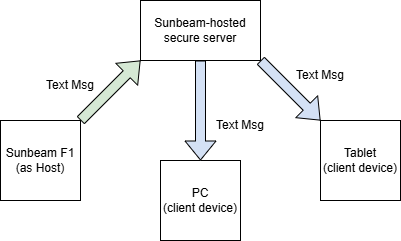
Sending a text message from a client works the same as syncing data from the host - except in reverse. The client encrypts the text message and uploads it to the server. The host then downloads and decrypts the data and finally sends the new text message. This ensures that all data in transit through the NumberLink service remains encrypted. However, once the message is being sent by the host device to the intended recipient, standard SMS/MMS is used to ensure compatibility with other devices.
Was this article helpful?
That’s Great!
Thank you for your feedback
Sorry! We couldn't be helpful
Thank you for your feedback
Feedback sent
We appreciate your effort and will try to fix the article